
![Hospital Software Implementation Guide: 5 Steps to Success [2026]](/_next/image?url=%2Finfographics%2Fimplementation-timeline.png&w=2048&q=75)
Implementing hospital management software is a significant undertaking that can transform your facility's operations. This guide walks you through the proven 5-step process for successful implementation.
Why Implementation Matters
A well-planned implementation determines whether your hospital software becomes an asset or a liability:
Successful Implementation:
- Smooth transition with minimal disruption
- Staff adoption and buy-in
- Immediate productivity gains
- Long-term ROI realization
Poor Implementation:
- Staff resistance and workarounds
- Data integrity issues
- Extended learning curves
- Failed deployments
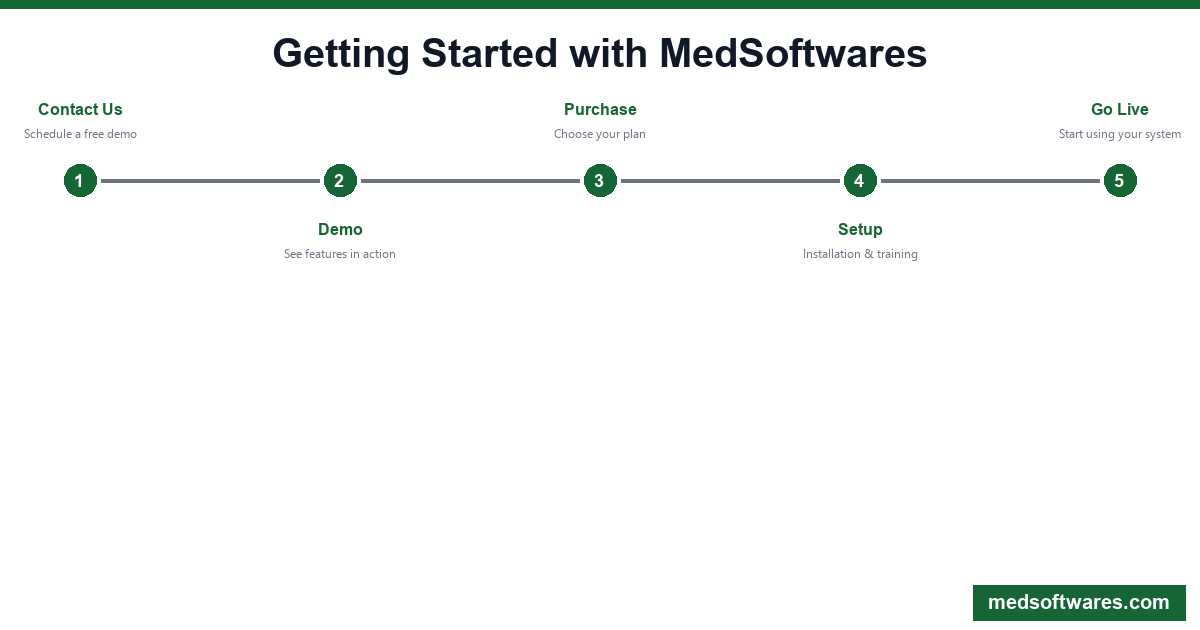
The 5-Step Implementation Process
Step 1: Contact & Discovery
Duration: 1-2 Days
The implementation journey begins with understanding your facility's specific needs:
- Facility Assessment: Number of beds, departments, staff, daily patients
- Current Workflows: Existing processes, pain points, manual workarounds
- Integration Requirements: Existing lab equipment, imaging systems, pharmacy
- Infrastructure Review: Network, hardware, internet connectivity
Key Questions We Ask:
- What departments need to be integrated?
- What are your biggest operational challenges?
- Do you have existing data to migrate?
- What's your timeline for go-live?
Contact MedSoftwares to start your discovery session.
Step 2: Demo & Customization
Duration: 1-3 Days
Once we understand your needs, you'll see HospitalOS in action:
Demo Includes:
- Full system walkthrough
- Department-specific features (OPD, IPD, Lab, Pharmacy, etc.)
- Customization options for your workflows
- Pricing discussion based on your requirements
Customization Options:
- Custom fields for patient registration
- Department-specific forms
- Report templates
- User roles and permissions
- Integration configuration
Step 3: Purchase & Planning
Duration: 1 Day
After selecting your plan, we create a detailed implementation plan:
HospitalOS Plans:
| Plan | Workstations | Best For | Price | |------|-------------|----------|-------| | Clinic | Up to 3 | Small clinics | $799 | | Hospital | Up to 10 | Mid-size hospitals | $1,499 | | Enterprise | Unlimited | Large facilities | $2,999 |
Implementation Plan Includes:
- Timeline with milestones
- Resource allocation
- Data migration strategy
- Training schedule
- Go-live checklist
Step 4: Installation & Setup
Duration: 2-4 Hours (Basic) to 2-3 Days (Enterprise)
Our technical team handles the complete setup:
Installation Tasks:
- Software installation on server/workstations
- Database configuration
- Network setup and testing
- User account creation
- Department configuration
- Integration testing
Data Migration:
- Patient records from existing systems
- Inventory data
- Staff information
- Historical records (where available)
Quality Assurance:
- End-to-end testing of all modules
- Integration verification
- Performance testing
- Security configuration
Step 5: Training & Go-Live
Duration: 1-3 Days
Training is critical for successful adoption:
Training Programs:
| Role | Training Focus | Duration | |------|---------------|----------| | Administrators | System config, user management, reports | 4-6 hours | | Doctors | EMR, prescriptions, patient records | 2-3 hours | | Nurses | Vitals, nursing notes, ward management | 2-3 hours | | Reception | Registration, appointments, billing | 3-4 hours | | Lab Technicians | Lab orders, results entry, reports | 2-3 hours | | Pharmacists | Dispensing, inventory, prescriptions | 2-3 hours | | Cashiers | Billing, payments, receipts | 2 hours |
Go-Live Support:
- On-site support during first days (Premium plans)
- Remote support available 24/7
- Quick reference guides for each role
- Video tutorials for self-learning
Best Practices for Success
1. Executive Sponsorship
Ensure leadership is committed and communicates the importance of the new system to all staff.
2. Champion Users
Identify tech-savvy staff in each department to become "super users" who help colleagues.
3. Parallel Running
Consider running old and new systems simultaneously for 1-2 weeks during critical transitions.
4. Phased Rollout
For large facilities, consider department-by-department implementation:
Week 1: Registration & Billing Week 2: OPD & Appointments Week 3: IPD & Nursing Week 4: Laboratory & Pharmacy Week 5: Full integration
5. Feedback Loops
Establish channels for staff to report issues and suggestions during early adoption.
HospitalOS Implementation Benefits
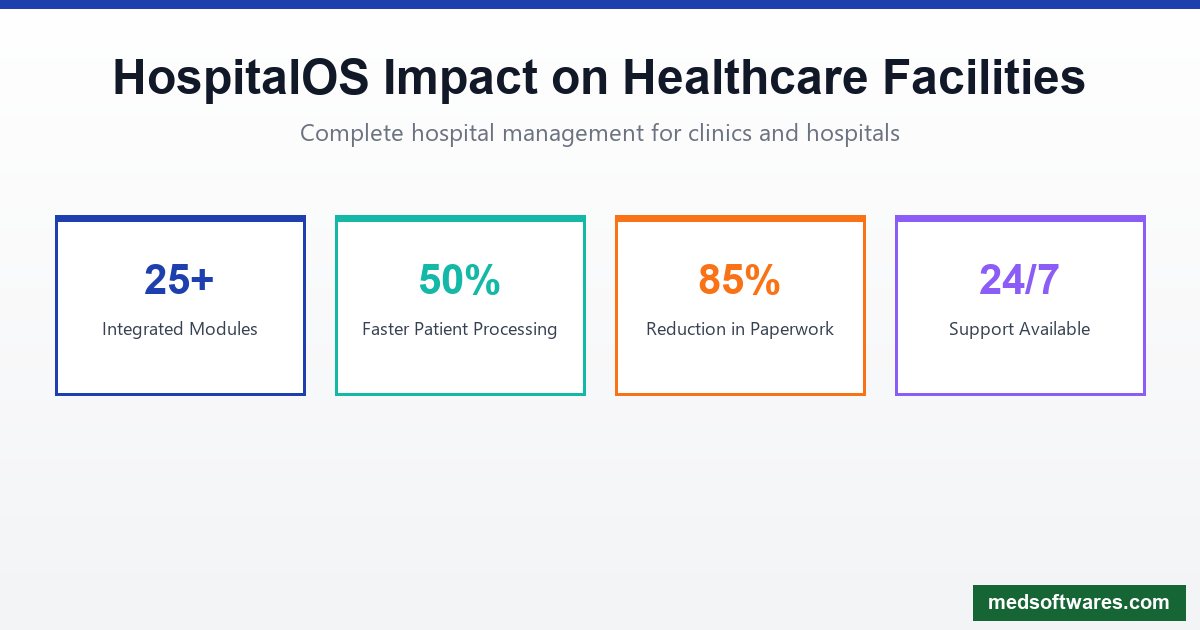
What You Get:
- 25+ Integrated Modules: All departments in one system
- 50% Faster Patient Processing: Streamlined workflows
- 85% Less Paperwork: Digital records everywhere
- 24/7 Support: Help when you need it
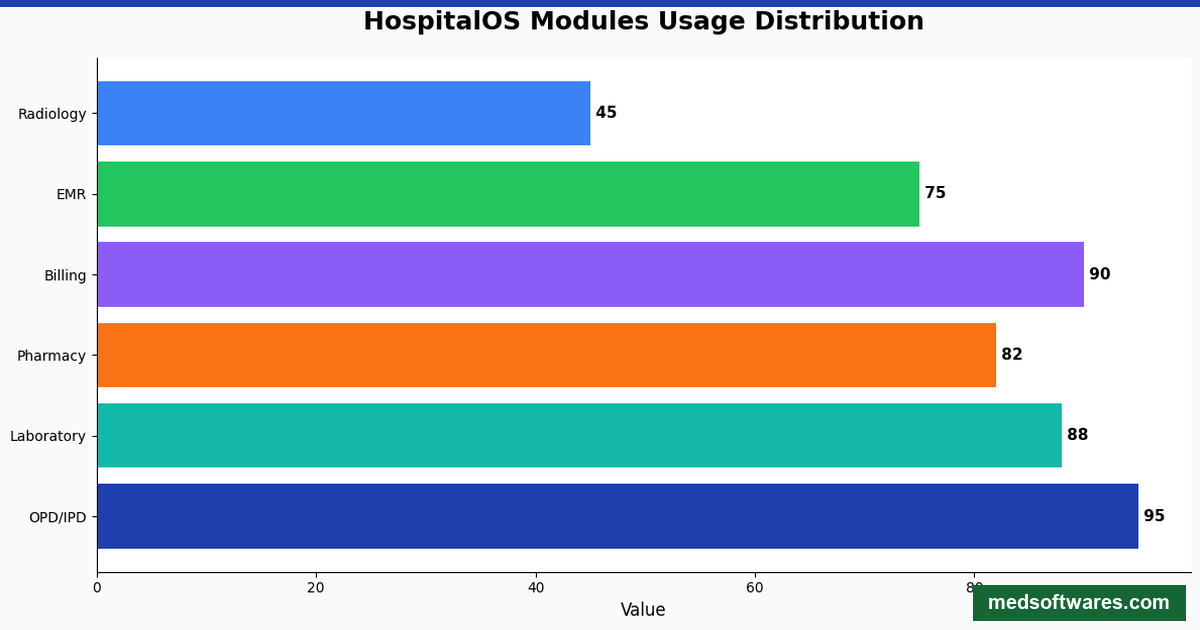
Modules Included:
- Patient Registration
- Outpatient Department (OPD)
- Inpatient Department (IPD)
- Emergency & Triage
- Laboratory Management
- Radiology & Imaging
- Pharmacy
- Billing & Cashier
- HR & Payroll
- Inventory & Procurement
- Queue Management
- Appointment Scheduling
- Electronic Medical Records
- Nursing Station
- Operating Theatre
- And more...
Common Implementation Challenges (And Solutions)
Challenge 1: Staff Resistance
Solution: Involve staff early, demonstrate benefits, provide thorough training, and celebrate early wins.
Challenge 2: Data Migration Issues
Solution: Clean data before migration, validate after migration, keep old system accessible temporarily.
Challenge 3: Internet Reliability
Solution: HospitalOS works offline and syncs when connected—no productivity loss.
Challenge 4: Hardware Limitations
Solution: HospitalOS has minimal requirements—works on existing computers in most cases.
Challenge 5: Time Constraints
Solution: Flexible training schedules, role-based learning, video tutorials for self-paced learning.
Post-Implementation Support
Implementation doesn't end at go-live:
First 30 Days:
- Priority support access
- Daily check-ins (if needed)
- Quick issue resolution
- Additional training as needed
Ongoing Support:
- Email and phone support
- Software updates
- Feature requests consideration
- Knowledge base access
Ready to Implement?
Join hospitals across 30+ countries using HospitalOS:
- Request a Demo - See HospitalOS in action
- Get a customized implementation plan
- Start transforming your facility
Risk-Free: 30-day money-back guarantee on all plans.


