
![Clinic Appointment Scheduling Software: Complete Guide [2026]](/_next/image?url=%2Finfographics%2Fclinic-scheduling-benefits-2026.png&w=2048&q=75)
Appointment scheduling is the front door to your clinic. With the right software, you can reduce no-shows, improve patient satisfaction, and free your staff from endless phone calls. In 2026, patients expect self-service booking—clinics that deliver gain a competitive edge.
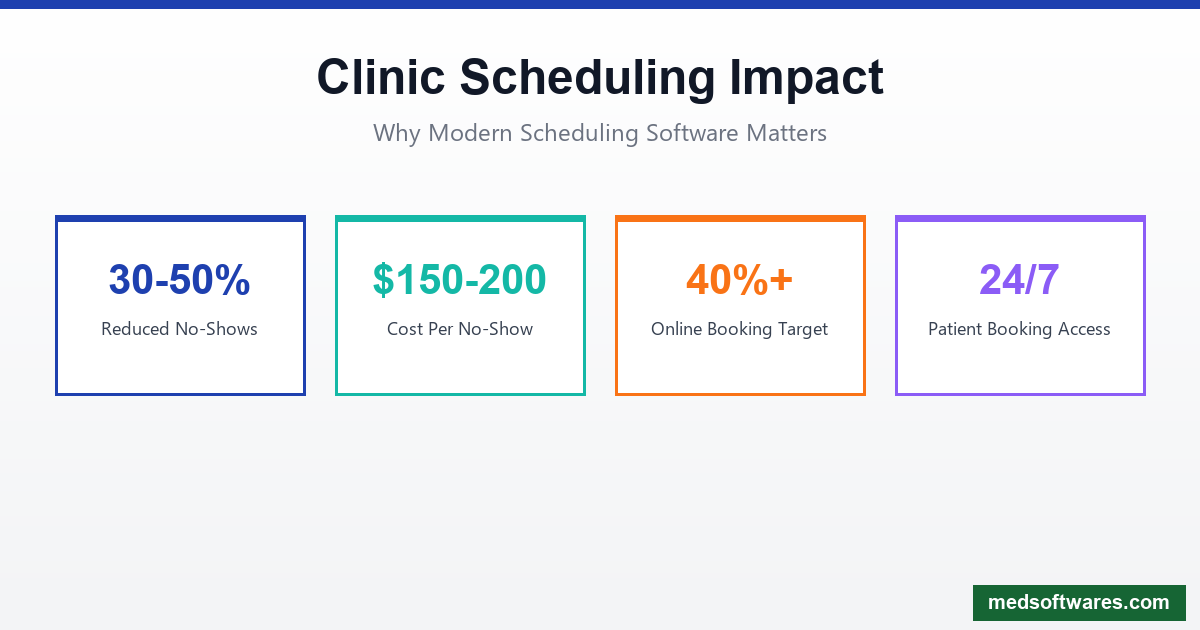
Why Scheduling Software Matters
The Cost of Poor Scheduling
- No-shows cost clinics $150-200 per missed appointment on average
- Phone tag consumes 30+ minutes of staff time per appointment
- Double-booking frustrates patients and creates chaos
- Long wait times drive patients to competitors
- Manual processes lead to errors and inefficiency
The Modern Patient Expectation
Patients book everything online—flights, restaurants, haircuts. Healthcare scheduling should be no different.
| Traditional Scheduling | Modern Scheduling | |-----------------------|-------------------| | Phone calls only | 24/7 online booking | | Hold times | Instant confirmation | | Business hours | Anytime access | | Paper reminders | Automated SMS/email | | Manual rescheduling | Self-service changes |
Essential Scheduling Features
1. Online Self-Scheduling
Patient Benefits
- Book anytime, anywhere
- See real-time availability
- Choose preferred provider
- Select appointment type
- Receive instant confirmation
Clinic Benefits
- Reduce phone volume by 30-50%
- Fill appointments 24/7
- Attract tech-savvy patients
- Staff focus on patient care
- Decrease data entry errors
Key Capabilities
- Mobile-responsive booking
- Multiple location support
- Service/visit type selection
- Provider preference
- New patient registration
- Calendar integration
2. Automated Reminders
Channels
- SMS text messages (highest open rate)
- Email reminders
- Push notifications (app users)
- Phone calls (automated)
- WhatsApp (international markets)
Timing Best Practices
- 1 week before (longer appointments)
- 2-3 days before (confirmation)
- Day before (final reminder)
- Morning of (same-day)
- Post-appointment follow-up
Reminder Content
- Appointment date/time
- Provider name
- Location with directions
- Preparation instructions
- Confirmation/reschedule links
- Cancellation policy
3. No-Show Reduction
AI-Powered Prediction
- Identify high-risk appointments
- Targeted intervention for at-risk patients
- Overbooking optimization
- Wait list management
- Pattern analysis
Prevention Strategies
- Easy rescheduling options
- Multiple reminder touchpoints
- Confirmation requirements
- Cancellation convenience
- Waitlist backfill
Expected Results
- Reduce no-shows by 30-50%
- Decrease cancellations by 25%
- Fill 80%+ of cancelled slots
- Improve patient engagement
4. Waitlist Management
Functionality
- Automatic waitlist additions
- Priority ranking options
- Instant notifications for openings
- One-click booking
- Expiration management
Benefits
- Fill cancelled slots quickly
- Reduce revenue loss
- Improve patient satisfaction
- Better capacity utilization
5. Multi-Provider & Multi-Location
Provider Management
- Individual calendars
- Custom availability rules
- Credential-based scheduling
- Provider preferences
- Coverage/substitute management
Location Features
- Site-specific schedules
- Room/resource booking
- Travel time buffers
- Cross-location visibility
- Centralized reporting
6. Resource & Room Booking
Coordinate Resources
- Exam rooms
- Equipment (ECG, ultrasound)
- Procedure suites
- Treatment chairs
- Staff availability
Avoid Conflicts
- Visual resource calendar
- Automatic conflict detection
- Dependency linking
- Setup/cleanup time buffers
Integration Requirements
EHR/EMR Integration
Essential Connections
- Patient demographics sync
- Appointment creates encounter
- Insurance information
- Medical history access
- Provider schedules
Benefits
- Single source of truth
- Eliminate duplicate entry
- Accurate patient data
- Streamlined check-in
- Complete documentation
Practice Management Integration
- Billing system connection
- Insurance verification
- Payment collection
- Reporting consolidation
- Staff scheduling
Communication Integration
- Phone system (caller ID lookup)
- Email platforms
- SMS gateways
- Video conferencing (telehealth)
- Patient portal
Security & Compliance
HIPAA Requirements
Protected Information
- Patient names
- Appointment details
- Medical information
- Contact information
- Provider assignments
Required Safeguards
- Encryption in transit (TLS)
- Encryption at rest (AES-256)
- Access controls
- Audit logging
- Business Associate Agreements
Security Best Practices
- Multi-factor authentication
- Role-based permissions
- Session timeouts
- Secure password policies
- Regular security audits
Implementation Guide
Phase 1: Planning (Week 1)
Assess Current State
- Document existing workflows
- Identify pain points
- Measure baseline metrics
- Gather stakeholder input
Define Requirements
- Must-have features
- Integration needs
- Budget constraints
- Timeline expectations
Phase 2: Configuration (Week 2)
System Setup
- Provider schedules
- Appointment types
- Location configuration
- Reminder templates
- User permissions
Integration
- EHR connection
- Calendar sync
- Communication setup
- Payment integration
Phase 3: Testing (Week 3)
Validation
- Booking flow testing
- Reminder delivery
- Integration verification
- Edge case handling
- User acceptance
Phase 4: Launch (Week 4)
Staff Training
- Front desk workflows
- Provider interactions
- Troubleshooting
- Patient support
Patient Onboarding
- Announcement communications
- Website integration
- Tutorial materials
- Support availability
Phase 5: Optimization (Ongoing)
Monitor & Improve
- Track adoption metrics
- Analyze no-show rates
- Gather feedback
- Refine workflows
- Expand features
Metrics to Track
Operational KPIs
| Metric | Target | Measurement | |--------|--------|-------------| | Online Booking Rate | 40%+ | Online bookings / Total bookings | | No-Show Rate | Under 5% | Missed / Total appointments | | Reminder Response | Over 80% | Confirmations / Reminders sent | | Average Wait Time | Under 15 min | Actual vs. scheduled time | | Utilization Rate | 85%+ | Booked / Available slots |
Patient Satisfaction
- Ease of booking (survey)
- Reminder helpfulness
- Wait time satisfaction
- Overall scheduling experience
- Net Promoter Score (NPS)
Financial Impact
- Revenue per slot
- Cancellation revenue recovery
- Staff time savings
- Phone cost reduction
- Patient retention value
Special Scheduling Scenarios
Telehealth Appointments
Requirements
- Video platform integration
- Virtual waiting room
- Tech check reminders
- Link delivery
- Recording consent
Best Practices
- Test connection reminders
- Backup phone option
- Clear instructions
- Technical support availability
Multi-Appointment Scheduling
Use Cases
- Annual physicals + labs
- Procedure + follow-up
- Family appointments
- Complex care coordination
Features Needed
- Appointment linking
- Time gap requirements
- Location coordination
- Single confirmation
Walk-In Management
Queue Features
- Digital check-in
- Wait time display
- Position tracking
- SMS notifications
- First-come priority
HospitalOS Scheduling Module
HospitalOS includes comprehensive scheduling designed for clinics in developing markets:
Core Features
Online Booking
- Patient self-scheduling
- Provider availability display
- Appointment type selection
- Instant confirmation
- Mobile-friendly interface
Automated Reminders
- SMS text messages
- WhatsApp integration
- Email notifications
- Configurable timing
- Multi-language support
Calendar Management
- Provider schedules
- Multi-location support
- Resource booking
- Conflict detection
- Drag-and-drop interface
Reporting
- No-show analysis
- Utilization reports
- Volume trends
- Provider productivity
- Revenue impact
Features for Developing Markets
SMS/USSD Access
- Book via text message
- USSD for basic phones
- No smartphone required
- Low bandwidth optimized
Offline Capability
- Schedule when offline
- View appointments locally
- Sync when connected
- Print schedules
Local Payments
- Collect deposits via mobile money
- M-Pesa, MTN MoMo, Airtel Money
- No-show fee collection
- Payment reminders
Pricing
One-time license starting at $799 includes:
- Unlimited appointments
- Online booking portal
- Automated reminders
- All providers/locations
- Lifetime updates
Emerging Trends
AI Scheduling Assistants
- Natural language booking ("Schedule me next Tuesday afternoon")
- Intelligent slot suggestions
- Predictive no-show management
- Automated rescheduling
- Voice-enabled booking
Conversational Booking
- SMS booking conversations
- WhatsApp appointment bots
- Facebook Messenger integration
- Voice assistant scheduling
- Chat widget embedding
Predictive Analytics
- Demand forecasting
- Optimal scheduling patterns
- Staff requirement prediction
- Resource utilization optimization
- Revenue maximization
Conclusion
Modern clinic scheduling software is essential for patient satisfaction and operational efficiency. The right solution reduces no-shows, saves staff time, and improves revenue.
Key benefits:
- 24/7 booking for patient convenience
- Automated reminders reduce no-shows by 30-50%
- Staff efficiency from reduced phone time
- Better utilization through waitlist management
- Improved satisfaction for patients and staff
HospitalOS provides comprehensive scheduling:
- Online self-service booking
- Multi-channel reminders (SMS, WhatsApp, email)
- Offline capability for reliability
- Local payment integration for your market
- One-time pricing from $799
Modernize your clinic's scheduling today.
![mHealth Mobile Apps for Hospitals & Clinics: Complete Guide [2026]](/_next/image?url=%2Finfographics%2Fmhealth-apps-market-2026.png&w=2048&q=75)

